
Under Attack?
Broken Network System?
Leave your details below and we’ll get back to you shortly
For each customer network — MVNO, data center, campus, and ISP core — I built its own AI agent, powered by a dedicated Skill.
It’s a copilot that knows the network inside out, analyzes its actual state, identifies risks, helps troubleshoot incidents, assesses resiliency, and advises before changes.
Along the way, it also produces HLD/LLD documents that stay current with the network.
How do you build an AI expert like that, and what did it find in four production environments that all appeared to be running perfectly?
Anyone who maintains a production network they didn’t build knows the question that comes up at 2 a.m., and the silence that follows it: “Wait — why is this configured like that?”
Then the investigation begins. You open three configs, track down whoever might remember, look at a diagram that’s no longer accurate, and end up making a decision based on an educated guess.
The network itself knows all the answers — it just doesn’t talk.
Over the past year, I stopped trying to solve this with yet another document.
Instead, I built a dedicated Skill for each customer network: not a documentation generator, but an agent that sits on top of that specific network and knows its platforms, its topology, its routing policy, and its history.
It answers operational questions, advises before a change, assesses resiliency and analyzes failure scenarios, opens tickets with full context — and produces the HLD and LLD along the way.
The documentation is a byproduct, not the goal. And that’s exactly the point: a document is a snapshot that starts going stale the moment it’s saved, while a live network needs something that evolves with it.
This post covers what goes in, what comes out, what it found in four production environments that were all running perfectly — and where a human still has to review the output.
You can read a network’s entire configuration and still not know whether it’s about to fall over.
The config describes intent. It doesn’t describe the state the network is actually in.
And there’s an entire layer of information that almost never gets documented, because it lives in the state, not in the config:
This information exists in RSI (Request Support Information) files on Junos and in the equivalent tech-support outputs on other platforms; throughout this post, “RSI” is shorthand for all of them.
But nobody reads an 80 MB dump by hand, and it’s exactly the kind of data that derails an upgrade or a migration when it’s already too late.
If you’re unfamiliar with Skills: a Skill is more than a prompt, and it isn’t a chatbot.
It’s a structured unit of knowledge that a model loads before it tackles a task — an instruction file (SKILL.md) that defines the role, what’s allowed, what’s forbidden, and the output format, together with the data files and scripts it’s permitted to use.
I work on Skills in an IDE, not in a chat interface.
The difference is fundamental: version control, a diff on every change to the instructions, the ability to split the knowledge into files by topic, and orderly refactoring as the Skill grows.
In a chat interface, it isn’t practical to manage an artifact that reaches 50 KB of instructions plus dozens of data files.
The Skill is a folder of Markdown files in a local git repository.
The format isn’t a minor detail — it’s the reason this works.
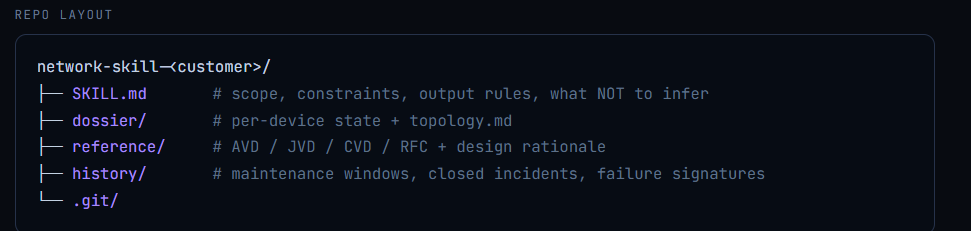
git log on the dossier is the network’s timeline. git diff between two scans is exactly what changed.This ties directly into portability: the Skill doesn’t just read the files — it writes to them. After a scan, a maintenance window, or a closed incident, it updates the dossier and history/ on its own, in Markdown, according to the schema defined for it.
What this means: the state lives in the files, not inside the model.
The accumulated knowledge isn’t stored on a vendor’s platform, there’s no fine-tuning to repeat, and the instructions, structured knowledge, and history move from one LLM to another intact.
A new model may need its behavior re-tuned and its tool integrations adjusted, but the knowledge itself isn’t lost.
Keeping the files local doesn’t mean the LLM provider never sees the data, though: whatever the model reads is processed by the provider, and how it’s retained depends on the deployment and its data-retention controls.
As the history grows, it can be moved out of the repo into an external database — PostgreSQL for incidents and change records, or TimescaleDB for time series of scans and counters — leaving only the current state in the repo, with references to the database. The Skill accesses both.
That’s what makes it possible to ask “When did this interface last flap, and what changed that week?” without keeping two years of telemetry in text files.
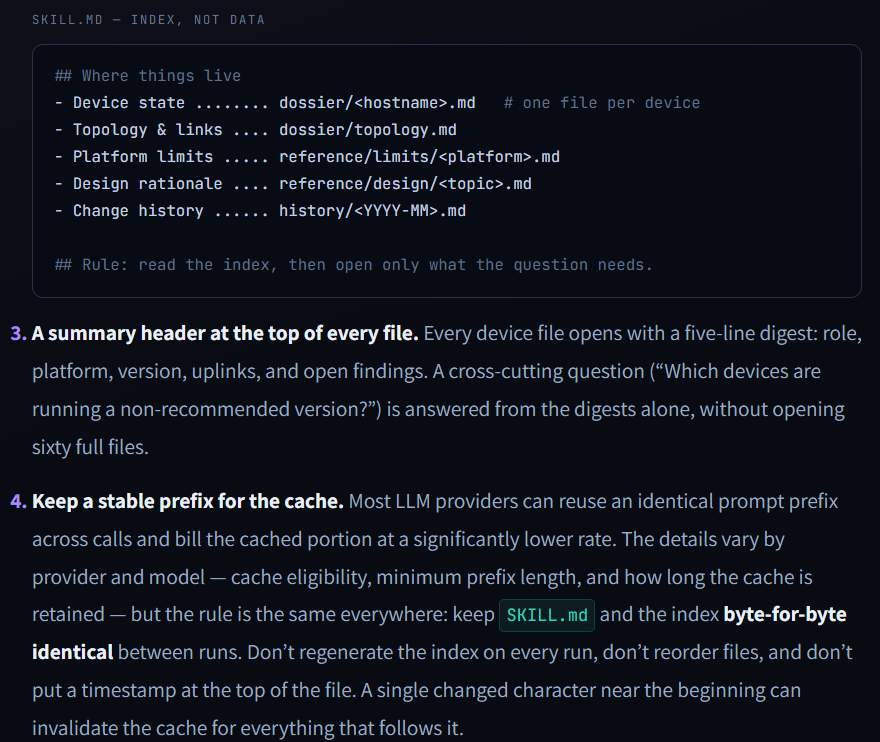
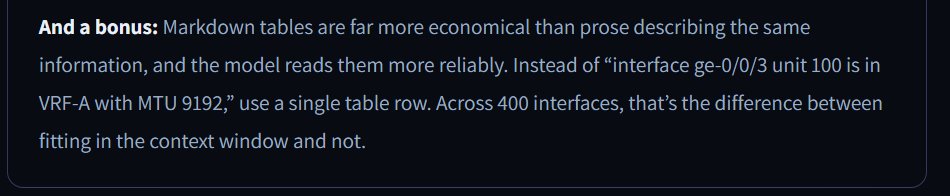
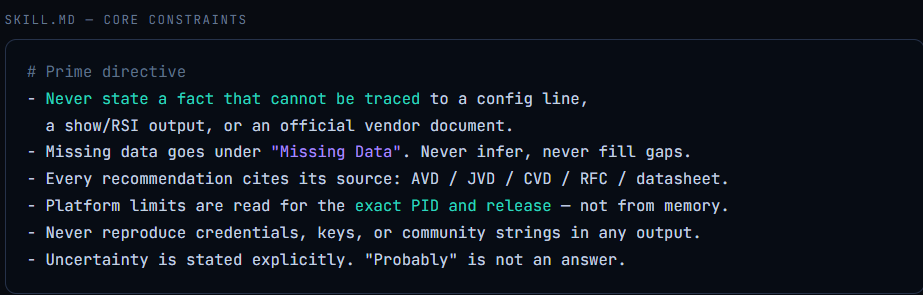
These rules weren’t born fully formed.
They took shape customer by customer, each one following a case where the tool returned something that sounded great and was wrong.
This tuning — identifying where the model tends to fill in gaps, where it’s overconfident, and where it misses something precisely because the question wasn’t asked the right way — is most of the work of building a Skill, and it’s what turns a demo into a tool I’m willing to bring into a production network.
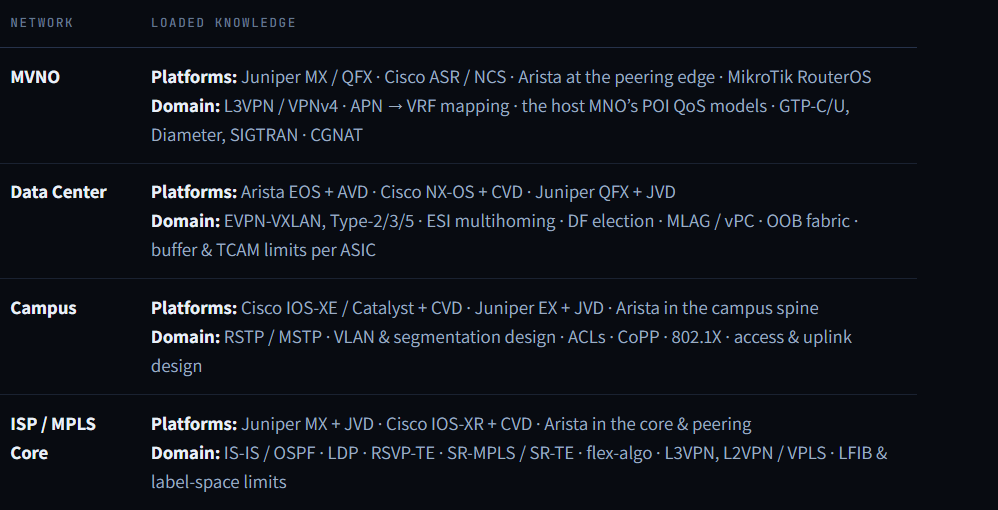
We want each Skill to specialize in exactly the environment it’s authorized to work in, in terms of both knowledge and technologies.
Not a generalist who knows a little about everything, but an expert in one network and what runs on it:
The first step is building a network baseline — a complete, verified snapshot of the as-built state at a single point in time.
It’s the reference point against which every gap, every change, and every drift is measured.
Once the baseline exists, every piece of information that arrives afterward is relevant and can be cross-checked: no more “I think it used to be like this” — there’s a diff.
The baseline is built from four sources:
Then the agent doesn’t touch production at all.
You build an isolated, continuously updated replica of the network’s collected configuration, operational state, and telemetry, and run all the queries against it.
The metrics are copied from VictoriaMetrics, the configs from the configuration backup system or from NetBox, and the state from a scheduled export.
The replica stays up to date on its own, and the Skill works only against it.
It’s a copy of the data, not a simulation of the network.
The advantage isn’t just separation from production.
Once you have an environment like this, you can build on top of it an organization-wide AI assistant that every engineer in the company works with — rather than a personal tool that everyone runs on their own copy.
Same source of knowledge, same answers, and a single access policy.
That’s the difference between one engineer’s successful experiment and a capability the organization relies on.
This scenario is more common than you’d think, especially in regulated environments.
There’s no requirement for the tool to connect to the devices: an engineer logs in, runs the command set, and exports the output, device by device.
The Skill receives files and works exactly the same way.
Sometimes this is also the right choice technically, not just organizationally.
A full collection set is dozens of commands per device, and some of them — show route on a large table, show tech — are heavy on the RE CPU.
When they run sequentially on a busy core device, the load is noticeable.
There’s a solution for that too: rate limiting between commands, splitting the collection into windows, running against the backup RE, using gNMI streaming instead of CLI polling where supported, and moving the expensive commands into a separate, low-frequency collection.
On most networks, we now run a hybrid — a one-time manual baseline, followed by a lightweight scheduled collection.
SKILL.md, and not by a policy document.And everything that comes in is first masked by offline tools that run locally: passwords, community strings, SSH keys, TACACS/RADIUS secrets, BGP authentication keys, the customer’s name, site names, and internal addressing.
The address mapping must be consistent — masking that replaces every address with a random string destroys the topology.
Building the Skill takes time. Once it exists, producing a document takes a single question — minutes, not weeks.
Live search sounds like a nice-to-have until you try to find ge-0/0/3 in an 80-page LLD.
The HLD and LLD don’t stop at describing what’s configured.
Every protocol, every design decision — and in critical places, every command — comes with a rationale: why it’s there, what it solves, what depends on it, and what would break without it.
That sounds pedantic until you run into an unusual hold-time, a policy term that looks unnecessary, or a lone static route in the middle of a BGP network — and discover that someone wrote it at three in the morning five years ago to work around a bug, and nobody has dared to touch it since.
And this isn’t a problem of bad documentation — it’s a problem of time.
A new engineer joining the team, or someone called in to handle an incident two years after the network was built, doesn’t know the network and wasn’t part of the decisions.
They see the outcome, not the reasoning that led to it, and not what was considered and rejected along the way.
That’s why the rationale has to be part of the documentation itself, rather than knowledge that lives only in the head of whoever built the network.
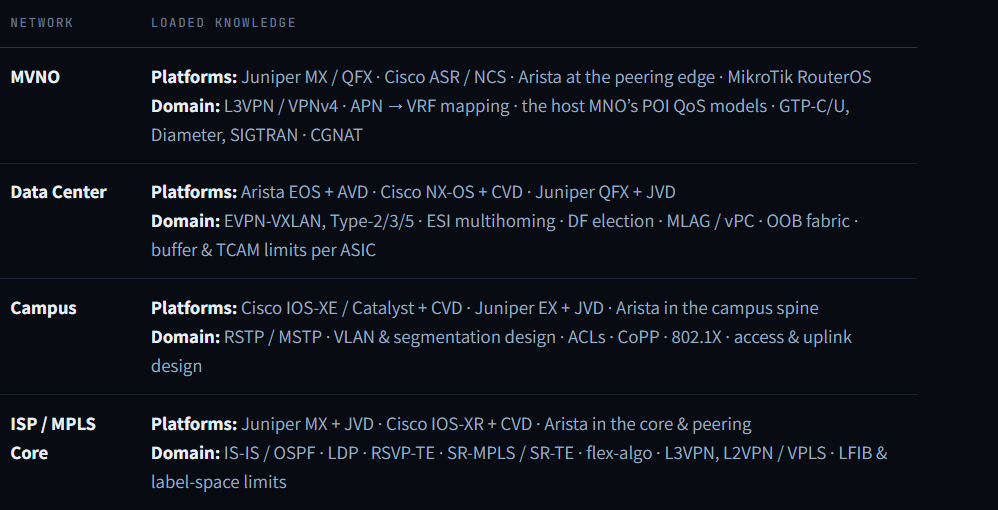
This is the part that gets the strongest reaction at the handover meeting — because in practice, nobody in the organization remembers why half the decisions were made. Here’s what gets explained for each type of network:
This is the most resource-intensive stage of the entire process — and, in my view, the most important one.
A topology drawing shows who connects to whom.
Understanding route propagation and forwarding behavior is a completely different question: how a given prefix gets from every point in the network to every other point.
Who advertises it, where it’s learned, where it’s filtered, which path is selected, and why that particular path.
To answer that, you have to dig into the routing tables themselves — the RIB, the FIB, and the per-VRF tables — not just the config. It’s heavy, it’s slow, and it’s what lets you answer the questions that actually keep people up at night: what happens when a site goes down, where the traffic will go, and where there’s a path that nobody planned for.
Every check in the process runs on IPv4 and on IPv6 as two separate checks.
This isn’t done for completeness’ sake — it’s a consistent source of findings:
In networks built a decade ago, IPv6 is almost always half-deployed, and nobody realizes it.
The Gap Matrix says what’s broken.
The Stabilization Plan is the document that translates it into an order of operations: what comes first, what depends on what, what can be done live, and what requires a maintenance window — so that the fix itself doesn’t become an outage.
Here are three real dependencies that went into plans I wrote:
Deploying protect-RE on all the MX routers was the first phase, ahead of any other change — because every routing change generates temporary control- plane load, and that’s exactly the moment you don’t want to be exposed.
MTU inconsistencies along the path had to be validated and corrected before aggressive BFD timers were enabled.
Standard BFD packets are small and can keep flowing while larger packets are dropped, so BFD won’t reliably detect a path-MTU problem; MTU validation and convergence testing have to be handled as separate checks.
In the reverse order, instability caused by the existing MTU problem would have been easy to blame on the newly enabled BFD timers, hiding the real cause.
Moving a provider’s BGP session from the CCR to the MX depended on first expanding the P2P subnet from a /30 to a /29, so that a redundant session and VRRP could run at the same time — and so the migration never went through a window with only a single session.
This is the part the whole process exists for.
It goes well beyond “BFD is missing,” because it’s derived from the RSI itself.
Every row in the Gap Matrix has a source: a section in an AVD, a recommendation in a JVD, a specific RFC, or output from the RSI. That’s the difference between “I think it’s worth doing” and a finding you can defend in a meeting.
Up to this point, it’s documentation. From here on, it’s a system. The Skill is exposed as an agent via MCP, hooks, or an API, and connects to the enterprise tools the organization already uses — Teams, Slack, Jira, ServiceNow, Telegram.
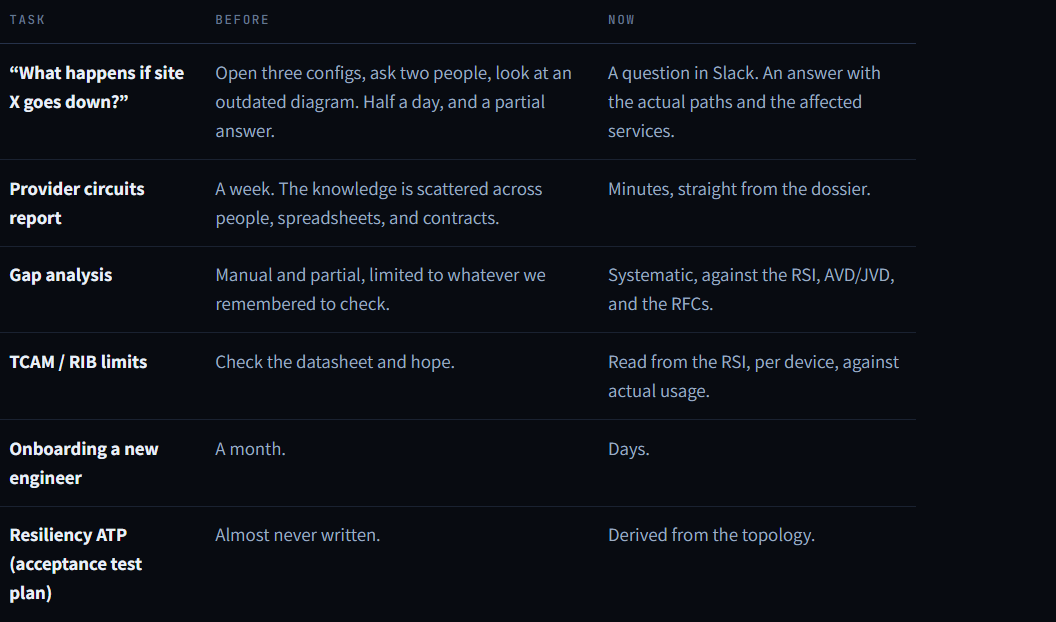
From then on, any engineer in the organization — not just the one who built the network — can ask questions in plain language:
The answer comes from the actual topology, the actual policy, and the actual metrics.
The Skill doesn’t run these tests and doesn’t touch production equipment.
What it does is write a professional ATP — and above all, derive the expected results, the part that almost never gets written properly, because it requires knowing exactly what’s supposed to happen when a specific link is pulled.
And that’s exactly what the Skill can derive: pull the primary link at site A, and the traffic should fail over to the second PE in under X, the LSP should converge onto the backup path, and the VRF table should look exactly like this.
Failure scenarios included in the ATP:
Every test follows a fixed structure: objective · precondition · action · expected result · pass/fail criteria · actual result.
The engineer supplies what the machine doesn’t know: what’s business-critical and what the SLA is.
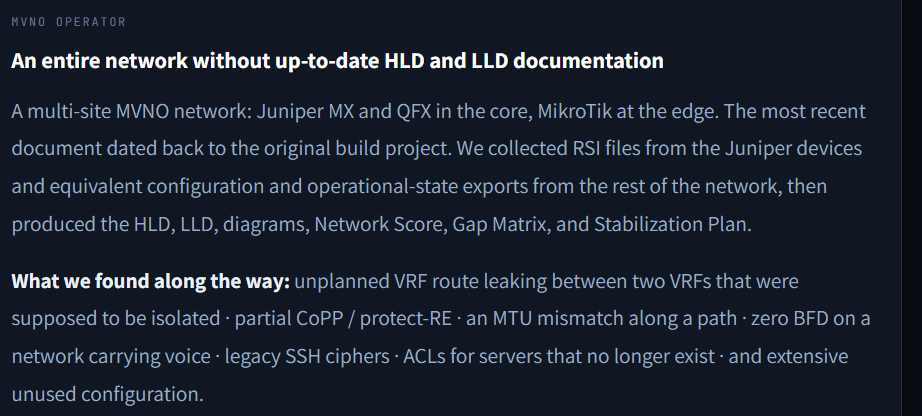
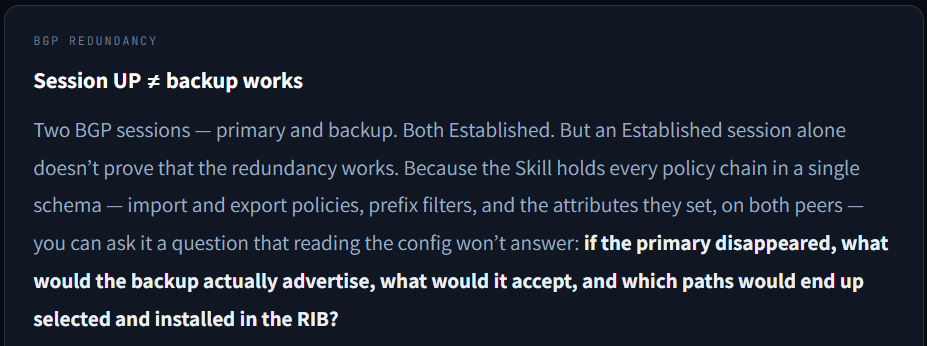
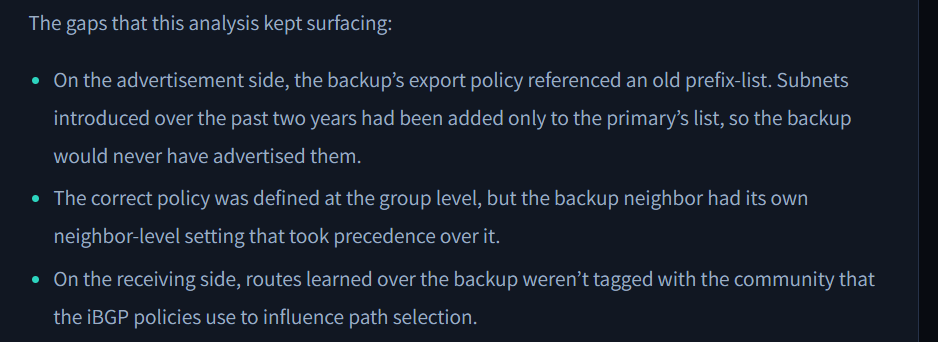
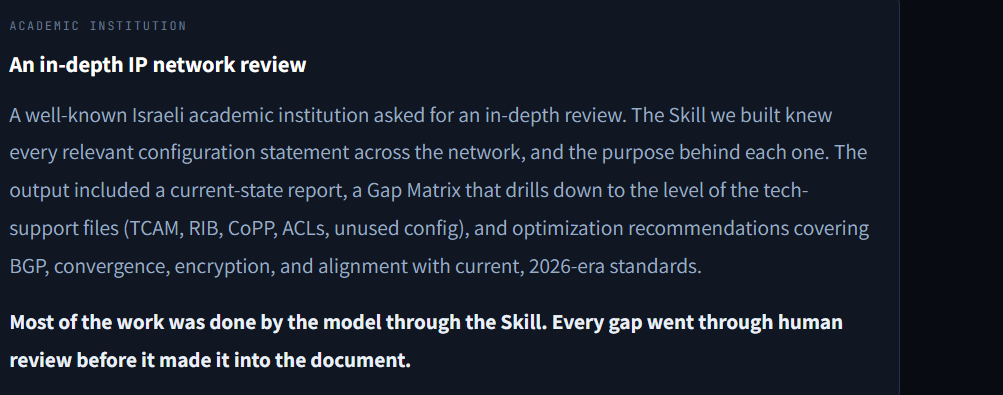
All of the findings below came from production environments without a single open incident, run by experienced teams who have known their networks for years.
This isn’t a story about neglected networks.
This is the part that doesn’t make it into presentations, and it’s the part that determines whether the result is worth anything.
A good Skill isn’t a long prompt — it goes through iterations, and the first one I built was significantly worse than the fourth.
SKILL.md I write includes an explicit Missing Data section: anything that isn’t found in the material is recorded as missing rather than filled in by inference.SKILL.md. After a few cycles, it stabilizes.Network engineers have been among the last to adopt this, and I think rightly so.
A developer who gets bad code sees it at compile time or in a test.
A network engineer who gets a bad recommendation finds out during a maintenance window, on live equipment, with customers behind it.
There’s no undo here.
But for some, that caution has turned into one of two wrong extremes: either ignoring the tool entirely, or the opposite — copying its output without reading it. Both are mistakes, and both stem from the same root cause: nobody defined who is accountable for the outcome.
So let’s make it explicit. The responsibility is ours, as engineers. Always.
Not the model’s, not the tool’s, and not that of whoever wrote the Skill. AI output is a suggestion, not an approval.
It counts as correct only after an engineer has verified it against the equipment and understood why it’s correct, and can explain what will happen when it’s applied.
And that’s exactly what makes the tool useful rather than dangerous: it shortens the path to the answer, not the path to the decision.
The time saved on retrieval and cross-checking is freed up for thinking — which is exactly the time that was missing before.
Oasis supplied Telit with new FORTINET security equipment for sites around the world, replacing firewall systems that had reached End of Support,…
Learn moreShortly after the COVID-19 pandemic broke out, supply chain problems began to appear around the world. In a classic butterfly effect, reduced…
Learn moreAs AI continues to take higher attention both in and out of the technology world, this trend doesn’t skip the networking industry.…
Learn moreLeave your details below and we’ll get back to you shortly